

For HR teams, the right training video features usually matter more than camera specs or flashy edits. At Q Filmz Media, an Edmonton video production company, we keep seeing the same pattern across internal training projects: the videos that hold up in real workplaces are accessible, role-specific, and built for LMS delivery from day one.
TL;DR: Summary
- HR teams should request captioned, role-based, LMS-ready training videos that use realistic workplace footage and interactive learning prompts, not generic watch-only modules.
- Q Filmz Media treats captions, instructional overlays, visual cues, and LMS formatting as core training-video features because rollout, accessibility, and tracking matter as much as the edit itself.
- WCAG 2.2 sets hard accessibility requirements, including captions for prerecorded audio and audio description or a media alternative for prerecorded video content.
- OSHA-style training logic is clear: video alone is not enough when the training also needs interaction, testing, or site-specific instruction.
- Research on in-video annotations and on-screen text shows better learning outcomes, especially for multilingual teams and employees learning technical procedures.
That matters in Edmonton, where many employers train across offices, industrial sites, events, and field operations. If your team is commissioning onboarding, safety, compliance, or process training, the best question is not “Can this video look polished?” but “Will this video actually work inside our workflow?”
Why do training video features matter more than production style?
A training video succeeds when features support recall, compliance, and rollout across Edmonton workplaces, not when it only looks polished. W3C accessibility rules, LMS tracking, and realistic workplace visuals usually matter more to HR than cinematic style alone.
Training videos are operational tools. They need to help a new hire complete a task correctly, help a manager document completion, and help HR deliver the same message across locations or departments. That is a different standard from a brand campaign or a recruiting reel.
In Edmonton and across Alberta, that often means training content for oil and gas teams, non-profits, municipal staff, education, real estate, or corporate offices. Each setting changes what “good” looks like. A great internal video may need captions, signage callouts, multilingual text, and versioning by role, even if the visual style stays simple.
“Q Filmz Media has delivered 500+ projects and treats LMS formatting, captions, and role-specific edits as production requirements, not add-ons.”
A common mistake is treating training video as a shorter version of marketing video. HR is usually buying consistency, retention, and auditability. If those are the goals, production decisions should follow them.
Which accessibility features are non-negotiable for HR training videos?
Closed captions, audio description, and instruction design that does not rely only on colour or sound are non-negotiable. WCAG 2.2 makes these practical requirements, not nice-to-haves.
W3C’s WCAG 2.2 requires captions for all prerecorded audio content in synchronized media. It also requires audio description or a media alternative for prerecorded video. If you are streaming live town halls or orientation sessions, live captions matter too.
This has direct consequences for HR. A training module cannot assume everyone will hear the narrator clearly, recognize a warning only by its colour, or infer a step because an arrow appears in one corner of the screen. Instructions need spoken explanation, visible text, and clear context.
Research also supports this approach. A 2025 review of video-based learning found that in-video annotations improved learning outcomes in multiple studies. The same review found that visual support, including figures and on-screen text, helped learners who are not native English speakers.
Pro tip: captions are not just for silent playback on a phone. In many workplaces, captions improve comprehension for employees in noisy rooms, multilingual teams, and anyone reviewing training quickly between tasks.
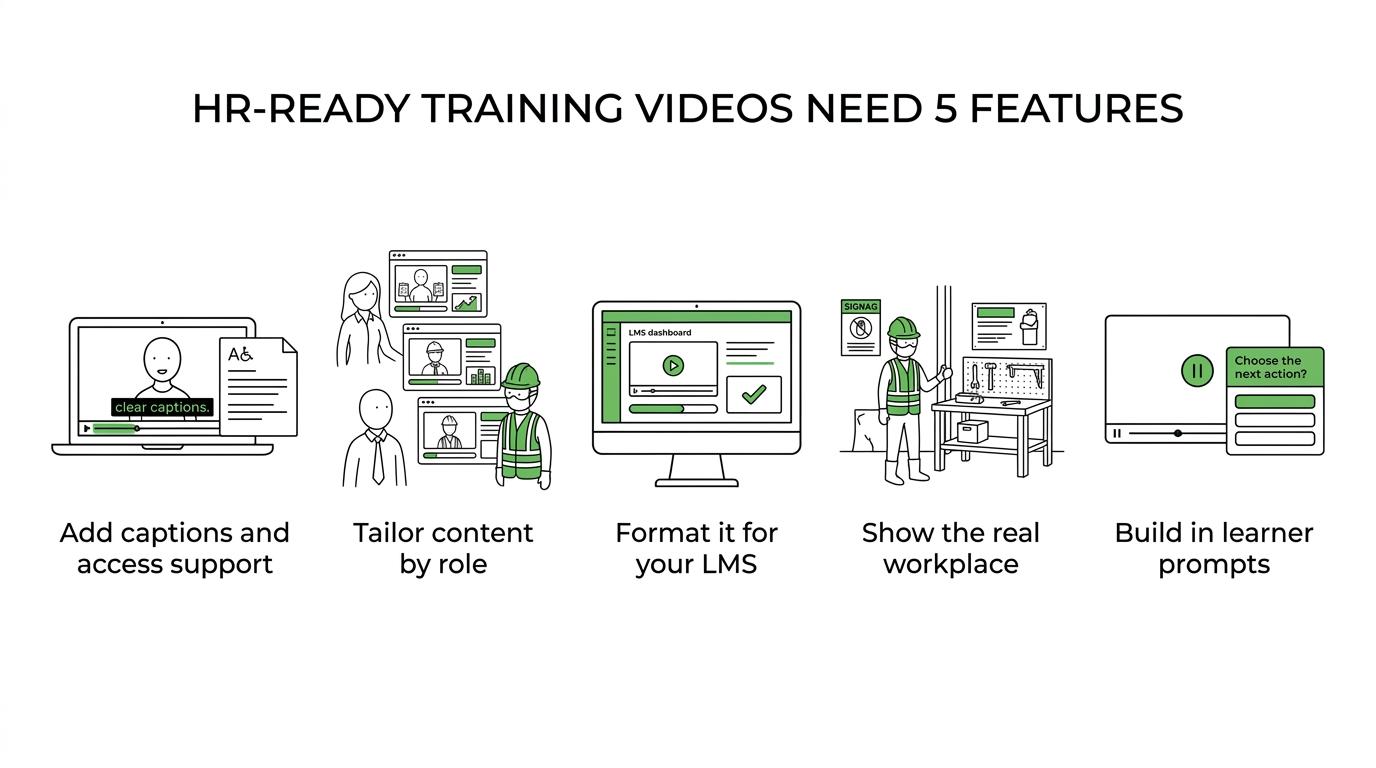
What training video features should HR teams request now?
The best training videos combine accessibility, delivery readiness, and real-workplace relevance. HR teams should ask for features that improve learning transfer, not just viewer completion.
If you are writing a brief for a vendor or reviewing a proposal, these are the nine features worth requesting upfront:
- Closed captions and a transcript for every module.
- Audio description or a text-based media alternative when visuals carry essential meaning.
- LMS integration or formatting that fits your internal learning platform.
- Role-based versions for different departments, seniority levels, or risk exposures.
- In-video annotations, labels, and on-screen text for procedures, tools, and decision points.
- Practice prompts or knowledge-check moments built into the delivery flow.
- Real on-site footage showing actual PPE, signage, tools, screens, and spaces.
- Short modular edits instead of one long all-purpose video.
- Update-friendly source structure, plus multilingual caption options where needed.
If a proposal misses half of those, you are probably looking at a watch-and-forget asset rather than a durable training system.
How should HR teams scope role-based versions step by step?
Start with shared tasks, risk points, and required decisions. Q Filmz Media usually scopes role-based versions by mapping one core module, then separate edits for supervisors, new hires, or field staff.
Step 1 is to define the universal content. This is the part every employee must know, like reporting procedures, privacy basics, workplace conduct, or facility orientation. The same logic applies to sensitive people-policy topics, where clear baseline guidance reduces inconsistency; Unik Afsked’s overview of fri ved dødsfald shows how quickly HR communication can become unclear when rules, pay, and leave expectations are not explained plainly.
Keep that material stable so it can anchor the whole series.
Step 2 is to identify where roles split. A warehouse lead, front-desk coordinator, and site supervisor may all need the same policy overview, but they do not need the same scenarios. Different tools, permissions, hazards, and decision rights call for different cut-downs or alternate scenes.
Step 3 is to plan production around efficient reuse. One filming day can capture shared scenes, site-wide b-roll, and department-specific demonstrations if the script is structured properly. That saves budget and reduces duplicate approvals later.
“With 10+ years in Edmonton, Q Filmz Media plans training shoots around actual signage, PPE, tools, and department-specific scenarios.”
A common misconception is that role-based versions mean filming everything from scratch three times. In practice, the smart move is one master structure with targeted edits, overlays, and examples for each audience.
How do LMS-ready videos compare with file-only delivery?
LMS-ready video is usually the safer choice for HR. Q Filmz Media formats training content for platforms that track completion, host captions, and fit onboarding workflows, while file-only delivery leaves reporting and learner management to your team.
A plain .mp4 can work if you only need a quick reference video or a one-time internal announcement. It is fast, easy to send, and flexible. The trade-off is that HR often loses visibility into who watched it, where learners dropped off, and whether anyone completed related steps.
LMS-ready delivery supports stronger administration. Depending on the platform, that can include completion records, embedded quizzes, sequencing, learner groups, and expiry dates for recurring training. If your organization uses an LMS for onboarding or compliance, that structure matters more than most teams expect.
If your LMS requires SCORM packaging, xAPI support, or specific caption formats, ask before the script is locked. Pro tip: a video that looks finished can still fail operationally if it does not fit your internal platform.
If your team is planning training video production in Edmonton, the delivery method should be part of pre-production, not a post-production scramble.
How should you build interactive delivery instead of watch-and-forget training?
Training works better when video is one part of a learning flow. OSHA’s long-standing view is useful here: standardized video alone is not interactive, hands-on, site-specific, or test-based training.
Step 1 is to design pause points. After a key procedure or policy explanation, give the learner a prompt: identify the hazard, choose the next step, or confirm the escalation path. That can happen inside an LMS, in a facilitator guide, or in a supervisor-led discussion.
Step 2 is to connect viewing to action. If the video teaches an intake workflow, privacy protocol, or safety check, the learner should complete the workflow or checklist right after watching. That is where retention improves.
Step 3 is to build evidence. Use a quiz, practical demonstration, sign-off form, or manager observation. If training affects safety, compliance, customer experience, or equipment handling, you need more than a completion tick.
A useful rule is simple: if employees must perform the task, then the training should ask them to do something after the video.
What is the difference between realistic site-specific footage and generic stock video?
Site-specific footage teaches behaviour more clearly than generic stock clips. Actual workspaces, tools, and signage reduce ambiguity and make behavioural modeling more credible.
When employees see their own environment, they process the training differently. The location cues make the content feel relevant, and the procedure looks achievable in the place where they will actually perform it. That matters for safety orientations, equipment handling, access rules, customer-facing procedures, and department handoffs.
Stock footage still has a place. It can be useful for abstract topics, timeline pressure, or broad HR themes where the exact setting is less important. The trade-off is realism. If the training depends on identifying the right panel, the right PPE, the right entry point, or the right screen flow, stock visuals can weaken transfer.
There is another layer here. A 2025 study with 447 participants found that people preferred human-made teaching videos in learning experience, even when AI-generated videos produced equally high learning outcomes. That suggests HR teams should think carefully before replacing on-site human instruction with generic avatars, especially for culture, safety, or leadership training.
How should HR teams review scripts and on-screen instructions before filming?
The script should be reviewed as both a learning document and an accessibility document. Wording, visuals, and instructions all need testing before cameras roll.
Step 1 is to check every instruction for clarity. If the script says “click the green button on the right” or “follow the arrow,” rewrite it. WCAG warns against instructions that rely only on colour, visual location, shape, orientation, or sound.
Step 2 is to validate the real-world details. HR should review policy language, while operations or department leads should check tools, terminology, screens, PPE, and sequence accuracy. This is where many avoidable reshoots start.
Step 3 is to plan the overlays. Decide where on-screen text, labels, callouts, and chapter titles will appear. The best time to plan annotations is before filming, because framing and pacing affect whether those overlays will read clearly.
Pro tip: script approval is not just legal review. It is where training quality is set.
Which metrics show whether a training video is actually working?
The right metrics tie video completion to workplace performance. HR should track both learning signals and operational outcomes.
A high completion rate does not automatically mean the training was effective. People can finish a video and still miss the decision point that matters. Stronger evaluation combines video analytics, assessment performance, and behaviour after rollout.
Useful metrics include:
- Completion rate: Did employees actually reach the end of each module?
- Assessment lift: Do post-training scores improve against pre-training checks?
- Time to competence: Are new hires performing tasks correctly sooner?
- Error or incident trend: Are repeat mistakes, rework, or near misses falling after deployment?
- Manager observation: Can supervisors confirm correct behaviour on the job?
- Version relevance: Do different roles need different edits based on recurring confusion points?
If completion is high but errors stay flat, then the issue is usually one of three things: the module is too generic, the task needs hands-on follow-up, or the video is missing cues at the exact moment learners get stuck.
Ready to improve onboarding, compliance, or internal learning with professional video production in Edmonton? Contact Q Filmz Media for a free project consultation, and ask us about training videos, internal learning content, and corporate video production in Edmonton.