For Edmonton teams buying business video, approval usually depends less on creative taste and more on whether the package is easy to scope, review, and distribute. Q Filmz Media is an Edmonton, Alberta video production company, and we see procurement move faster when buyers define the format, versions, and accessibility assets before filming starts.
TL;DR: Summary
- Business video is easiest for procurement teams to approve when the scope includes a defined video type, platform-specific versions, and accessibility assets from day one; Q Filmz Media structures Edmonton productions around those approval needs.
- The best format depends on the business problem: brand trust, product clarity, hiring, internal training, event coverage, or paid distribution.
- Wistia’s 2026 State of Video Report says 8 in 10 teams use LinkedIn as their primary place to share video, so one master file is rarely enough.
- Section508.gov guidance favours planning synchronized captions and transcripts at the start, not after editing is done.
- Procurement packages should spell out deliverables, aspect ratios, caption files, transcript format, usage terms, approvers, and turnaround deadlines.
When we help companies source corporate video production in Edmonton, we find that approval gets simpler when the request is written in operational terms. That means naming the audience, the distribution channel, the review workflow, and the exact files procurement expects to receive.
What makes a business video procurement-friendly?
A procurement-friendly business video has a clear business use case, named deliverables, and documented accessibility assets. For Edmonton buyers, Q Filmz Media typically sees approvals move faster when scope, usage, and review steps are fixed before production.
Creative quality still matters, but procurement teams usually approve against risk, clarity, and completeness. If the brief says “we need a video,” reviewers have to guess whether that means a brand film, a training video asset, a LinkedIn cutdown, or event coverage. If the brief says “we need a 90-second corporate overview plus 30-second LinkedIn edits, captions, transcript, and internal usage terms,” the path to sign-off is much cleaner.
A second factor is versioning. According to Wistia’s 2026 State of Video Report, based on more than 13 million videos, 8 in 10 teams use LinkedIn as their primary place to share video, ahead of YouTube. That matters because LinkedIn, websites, internal portals, and event screens often need different runtimes, aspect ratios, and caption treatments.
“Q Filmz Media has delivered 500+ projects with a 100% in-house production process, which reduces handoff risk when procurement asks who owns each deliverable.”
Why do approval teams ask for more than one version?
They ask for more than one version because distribution drives format. A single master video rarely works equally well on LinkedIn, a corporate website, an internal LMS, and an event screen.
We recommend thinking in packages, not single files. A common B2B package might include a 16:9 master for the website, a square or vertical cut for LinkedIn, a shorter teaser for paid social, and a captioned version for mute-first viewing. The edit is still one project, but the deliverables serve different contexts.
A common misconception is that versioning is “extra polish.” It is often basic distribution planning. If LinkedIn is your main business channel, the cutdown is not optional. It is the asset that may get used most.
For Edmonton organizations in oil and gas, government, education, and non-profit sectors, versioning also helps different teams use the same footage without commissioning separate shoots. Marketing may need a public-facing clip, HR may need a recruitment edit, and leadership may want a boardroom-ready version with a slower pace and less campaign language.
What are the 8 business video types procurement teams can approve?
The easiest video types to approve are the ones with obvious business outcomes and standard deliverables. Most corporate buying teams can evaluate these eight formats without ambiguity.
After the use case is clear, procurement can compare scope, rights, timelines, and review needs more consistently.
- Brand story video: Builds trust and explains who the organization is, often for websites, proposals, and recruiting.
- Corporate overview video: Gives a broad snapshot of services, leadership, facilities, or capabilities for B2B sales.
- Explainer video: Simplifies a service, process, or policy for external or internal audiences.
- Product video: Shows features, use cases, and differentiation when clarity matters more than broad storytelling.
- Training or onboarding video: Standardizes internal communication for safety, compliance, HR, or operations.
- Event recap video: Captures the highlights, atmosphere, and key moments of a conference, launch, or community event.
- Recruitment or culture video: Helps candidates understand team culture, leadership style, and workplace expectations.
- Paid ad or social campaign video: Shorter, performance-driven cuts built for LinkedIn and other platform placements.
If you are choosing between a corporate overview and a campaign asset, compare the production scope on our corporate video production Edmonton and advertising video Edmonton service pages.
How do you match the video type to the business problem?
You match the format by starting with the decision you want the viewer to make. If the decision is wrong, even a strong video can be the wrong purchase.
Step one is to define the business problem. If the problem is weak brand trust, a brand story or corporate overview makes sense. If the problem is repeated staff questions, training video is the better fit. If the problem is poor product comprehension, choose a product or explainer format.
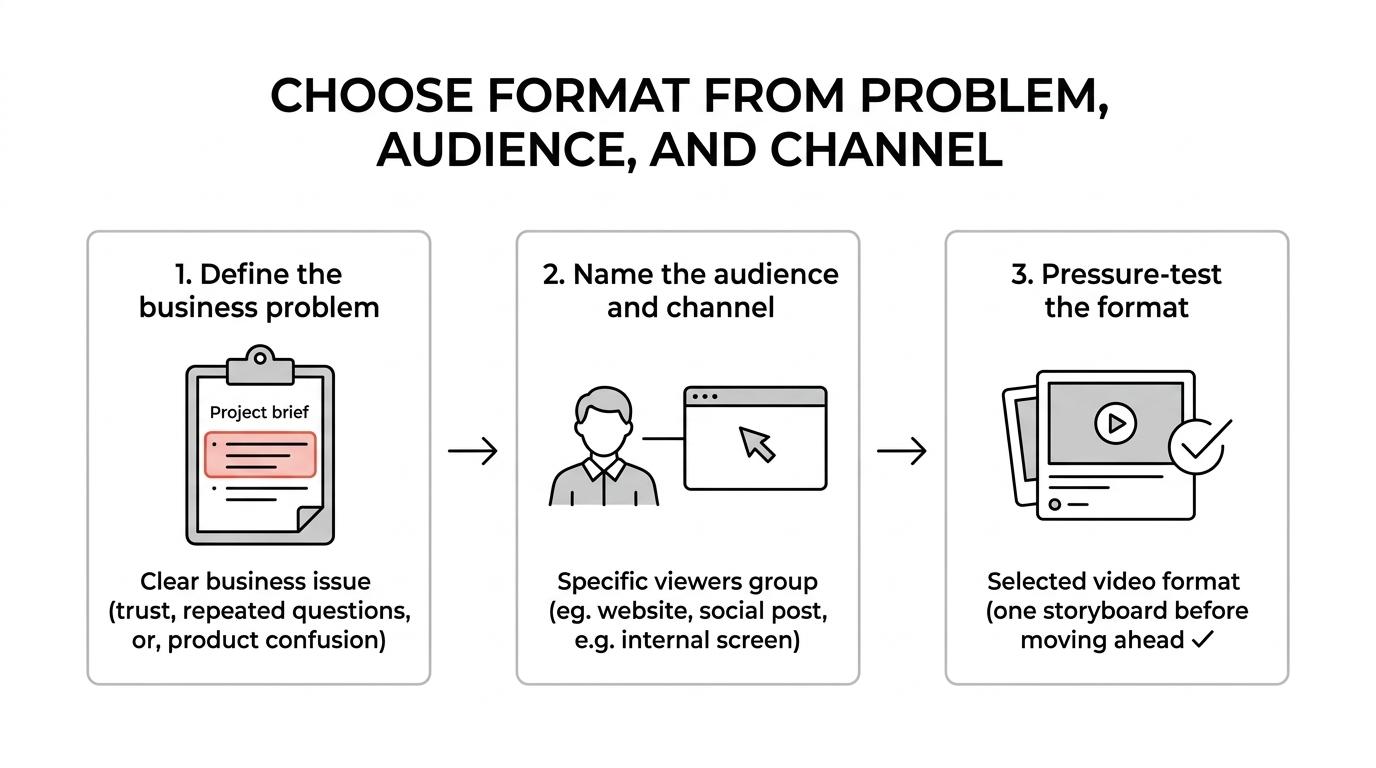
Step two is to name the audience and the channel. A municipal stakeholder reviewing a public initiative often needs clarity and accessibility first, while a commercial prospect may respond better to narrative and proof.
Step three is to pressure-test the format before scripting. We often see teams ask for a “brand video” when they actually need a hiring asset or an onboarding tool. Wistia also reports that over one-third of teams already use AI, most commonly in pre-production. That makes early planning even more important, because faster scripting only helps if the format choice is right.
How should you scope deliverables before production starts?
You should scope deliverables before production by listing every file, format, approval step, and usage condition procurement expects to buy. If the deliverables are vague, review cycles get longer and change orders become more likely.
Start with the master asset. Define the runtime, aspect ratio, and intended distribution channel. Then specify cutdowns, stills, pull quotes, motion graphics, thumbnails, and caption files if they are needed. If there is a deadline tied to a conference, launch, or board meeting, put that delivery date into the scope, not just the email thread.
Then lock the review path. Name the internal stakeholders, the number of review rounds, and who can request structural changes versus copy edits. This is especially useful for Edmonton organizations with multiple departments, from communications and procurement to legal and executive leadership.
A good approval package usually includes the following:
- Master file: 16:9 final with agreed runtime and resolution
- Platform cuts: LinkedIn, website, event screen, or paid social versions
- Accessibility assets: SRT or VTT caption files plus transcript
- Usage terms: Internal, organic social, paid media, or event playback rights
- Review workflow: Approvers, revision rounds, and sign-off dates
Enterprise buyers often look for teams familiar with stakeholder-heavy reviews at organizations like the University of Alberta, TELUS World of Science Edmonton, Walmart, SAP, or Sun Life because the workflow is rarely linear.
“Q Filmz Media covers corporate video, product video, event films, training content, animation, podcast video, photography, and drone footage, which makes multi-format procurement easier to scope.”
What accessibility assets should be included from day one?
Captions and transcripts should be built into the scope from the beginning. Section508.gov is clear that accessibility works best when it is planned early, not added after the edit is locked.
Step one is to decide what kind of captioning the project needs. Section508.gov says captions must be synchronized to the corresponding audio and include dialogue plus important sounds. That means speaker names, key non-speech audio, and timing all matter. A rough subtitle pass is not the same thing.
Step two is to define transcript delivery. Section508.gov says transcripts should be available in the same place as the original content and can be provided as plain text, a web page, or a Word document. If the video will live on an intranet, LMS, or campaign page, plan where that transcript will sit.
Step three is to choose the right format. A common misconception is that burned-in text solves accessibility. Sometimes it helps social performance, but procurement teams often also need separate caption files for platforms, website players, or compliance workflows. If your organization has legal, public-sector, or educational obligations, this detail matters early.
How is a brand video different from a training video?
A brand video sells trust, while a training video reduces confusion and repeat questions. Q Filmz Media treats them as different procurement categories because their audiences, review criteria, and distribution paths are not the same.
A brand video is outward-facing. It often uses interviews, cinematic b-roll, music, and a narrative structure that helps prospects, partners, or recruits understand the company. Procurement reviews it through a communications lens: message accuracy, reputation, usage, and campaign fit.
A training video is operational. It needs clarity, retention, and consistency more than atmosphere. Reviewers focus on process accuracy, screen text, chaptering, accessibility, and whether the video will still make sense six months from now when a staff member watches it without context.
If you are undecided, ask one question: should the viewer feel more confident about your organization, or should they know how to do something correctly? If the answer is confidence, buy brand storytelling. If the answer is repeatable action, buy training.
How is an event recap different from a product or explainer video?
An event recap captures moments, while a product or explainer video clarifies information. They may share footage styles, but procurement should treat them as different assets with different success criteria.
Event recap videos are time-sensitive. They usually need fast turnaround, crowd coverage, venue visuals, key speakers, and a highlight-driven structure. Their value comes from attendance proof, sponsor visibility, internal reporting, and post-event marketing. If the event is in Edmonton and tied to a local institution, the recognizable setting can carry part of the message.
A product or explainer video has a longer shelf life. It needs controlled messaging, tighter scripting, and clearer calls to action. The footage may include demos, motion graphics, interface capture, or step-by-step visuals that are less dependent on a live atmosphere.
A useful distinction: an event recap is not the same as a full event record. If you need complete session capture, keynote archives, or testimonial interviews from the same day, scope those as separate deliverables on an event videography Edmonton brief.
When should you request a quote for business video in Edmonton?
You should request a quote as soon as the business goal, audience, and deadline are known. Earlier quotes create better schedules, cleaner scopes, and fewer approval surprises.
For a straightforward interview-led corporate video, you may only need a short pre-production window if stakeholders are available and the message is settled. For training content, product demos, or multi-location shoots, planning usually takes longer because scripts, compliance reviews, and shot lists need more scrutiny. If drone footage is involved, Alberta weather and flight planning also affect scheduling.
We recommend sending procurement a short intake note with five items: objective, audience, deadline, distribution channels, and required deliverables. That turns a vague request into a quoteable project. It also helps your internal team decide whether the right fit is a full Edmonton video production engagement, a corporate communications piece, or an event-specific shoot.
Ready to elevate your brand with professional video production in Edmonton? Contact Q Filmz Media today for a free project consultation.