Conference sponsors usually get more value from one shoot when they ask for a package of distribution-ready edits instead of a single highlight file. At Q Filmz Media, we see this often on Edmonton conference productions: the footage that keeps working after the event is usually the shortest, easiest to post, and easiest to reuse.
TL;DR: Summary
- The best conference videography scope for sponsors is a main recap plus short, distribution-ready versions, captions, transcripts, and multiple aspect ratios; Q Filmz Media plans Edmonton event video this way because post-event reuse creates most of the value.
- Shorter edits are usually more usable across event pages, LinkedIn, email follow-up, and paid media than one long master file.
- Captions and transcripts are practical deliverables, not extras, because accessibility standards, muted autoplay, and repurposing all depend on them.
- If a sponsor needs YouTube ads, event-page engagement, and post-event sales follow-up, the deliverables should be scoped backward from those channels before filming starts.
- Sponsors usually get the strongest return from a recap, 15 to 30 second cutdowns, a 6 second teaser, caption files, transcripts, and platform-specific exports.
A sponsor package should support promotion, event-day visibility, post-event follow-up, and archive use. If you only request one polished file, your marketing team, sales team, and internal communications team often end up with far less usable content than they expected.
Why should sponsors define conference video deliverables before the event?
Yes, sponsors should lock deliverables before call time. Interviews, b-roll, signage coverage, graphics, and framing all change once you know whether the final assets are for LinkedIn, YouTube, event pages, or internal reporting. Q Filmz Media builds Edmonton conference videography around final use, not just around the shooting schedule.
That matters because a sponsor recap is captured differently than a full session archive. If we need a 9:16 social version, we have to protect framing for vertical crops. If we need executive sound bites, we have to schedule short interviews while the booth, stage, or networking area still looks active.
A common mistake is assuming editors can “make anything work later.” They can fix some issues, but they cannot invent missing speaker quotes, tighter vertical framing, or clean coverage of sponsor activations that were never filmed at the Edmonton Convention Centre or at a University of Alberta event.
“Q Filmz Media plans deliverables from final use backward, a workflow refined across 500+ projects.”
When sponsors define deliverables early, approvals get easier as well. Everyone knows what counts as success: booth traffic proof, partner exposure, audience reaction, thought-leadership clips, or a short recap that sales can send to prospects the following week.
How should sponsors match video deliverables to post-event distribution?
Start with channels, then assign formats, then rank priorities. Wistia and YouTube are useful benchmarks here because channel rules and viewing behaviour shape what will actually get used.
Step 1 is to map the audience. Ask who needs the footage after the conference: attendees, non-attendees, prospects, internal staff, sponsors, or media partners. If the audience is sales follow-up, then concise clips with one message often win. If the audience is registrants returning to the event page, a stronger recap or selected session clips may matter more.
Step 2 is to map the destination. Wistia’s 2026 State of Video Report was based on surveys of 900+ professionals and analysis of more than 13 million videos and 79 million hours of viewing data. Wistia reported that event pages had the highest engagement among its page-type benchmarks, and shorter videos had higher engagement rates. That is a strong signal for sponsors deciding between one long master and several shorter edits.
Step 3 is to rank must-haves. If budget is tight, decide which assets are non-negotiable. In many Edmonton corporate events, that means a main recap, two short cutdowns, captions, and a transcript before anything else. Nice-to-have files can come after that.
What are the 8 conference video deliverables sponsors should request?
The core package is not complicated. Sponsors usually need one anchor piece, several shorter variants, and the accessibility files that make distribution easier.
- Main sponsor recap: A 60 to 90 second edit that shows presence, energy, branding, attendee interaction, and one or two clean sound bites.
- Short social cutdowns: 15 to 30 second clips for LinkedIn, email follow-up, paid social, and sales outreach.
- Six-second teaser: Useful for YouTube bumper ads and fast awareness campaigns before or after the event.
- Multi-aspect-ratio exports: At minimum, request 16:9 and 9:16. Add 1:1 or 4:5 if feed placement matters.
- Caption files: SRT or VTT files support accessibility, silent autoplay, and easier platform uploads.
- Clean transcript: Helpful for recap pages, internal reports, blog posts, and search-friendly event summaries.
- Speaker or attendee selects: Short, isolated testimonials or thought-leadership clips that can live on their own.
- Archive master and thumbnail kit: A clean final master plus a chosen still frame or thumbnail saves time later.
The misconception here is that raw footage belongs on every sponsor wish list. Sometimes it does. Often it does not. Edited selects and platform-ready exports are usually far more usable than a hard drive full of unsorted conference footage.
How is a sponsor recap different from a full session recording?
A sponsor recap sells presence, while a session recording preserves information. They serve different jobs, and one should not be mistaken for the other.
A sponsor recap is built around emotion, visibility, and momentum. It shows the booth, brand placement, crowd interaction, keynote reaction, and the sponsor’s role in the event. It is usually short because it needs to travel across web, social, and follow-up channels without asking viewers for much time.
A full session recording is about completeness. It captures the keynote, panel, fireside chat, or workshop from start to finish. That is useful for continuing education, internal teams, or conference archives, but it is not usually the best sponsor asset if the goal is awareness or post-event conversion.
If you have budget for only one, choose based on use. If the sponsor needs proof of event impact, go with the recap. If the sponsor is paying to own an education track or thought-leadership session, a full recording may be the better deliverable. Many teams need both, but they should be scoped separately.
When do captions and transcripts stop being optional?
They stop being optional as soon as accessibility, silent viewing, or repurposing matters. W3C WAI treats captions and media alternatives as part of accessible prerecorded video delivery, and WCAG 2.1 includes Success Criterion 1.2.2 for prerecorded captions.
That standard matters beyond compliance language. On many channels, people watch with sound off first. Captions help the message survive muted autoplay on LinkedIn or embedded event pages. Transcripts help marketing teams pull quotes, build recap articles, and hand accurate copy to PR or internal communications.
There is also a quality issue. Auto-captions often misread industry acronyms, sponsor names, and speaker titles. That is a small mistake until a sponsor logo, executive name, or technical term appears incorrectly in a post-event asset. A cleaned transcript and reviewed caption file are usually worth the extra step.
If the audience includes public-sector teams, universities, or large employers in Edmonton, treat captions as baseline delivery. It is easier to scope them up front than to retrofit them later.
How should sponsors request versions for LinkedIn, YouTube, and event pages?
Sponsors should request channel-specific versions, not a generic export. Q Filmz Media scopes these Edmonton deliverables by destination because LinkedIn, YouTube, and event pages each reward different lengths, framing, and caption behaviour.
That same channel-first approach is visible in event marketing more broadly, where Ballonmand.dk shows how content tied to an event can keep working across social media and PR before, during, and after the day itself.
Step 1 is to define the destination before editing starts. Event pages often support slightly longer recap content because the viewer already has context and intent. LinkedIn usually benefits from quicker openings and tighter runtimes. YouTube may need a standard recap, a Shorts-ready vertical version, or an ad cut.
Step 2 is to set runtime windows. YouTube Help states that bumper ads are up to 6 seconds, and non-skippable in-stream ads commonly fall in the 15 to 60 second range depending on subtype. If a clip may become a bumper, it needs a single idea. If it is for post-event follow-up on LinkedIn, 15 to 30 seconds often gives enough room for context and branding.
“Q Filmz Media has spent 10+ years in Edmonton delivering agreed formats, not just one master file.”
Step 3 is to request framing, captions, and safe zones for each version. A clip that looks good in 16:9 can feel cramped in 9:16 if titles, faces, or sponsor signage were not planned for mobile crops. This is one reason distribution-ready versions should be part of the scope, not a late add-on.
What should sponsors ask about file handoff, naming, and usage rights?
Sponsors should ask for a clear delivery spec. File format, naming, licensing, and archive terms affect how fast the content can move after the conference.
Step 1 is to define the handoff package. Step 2 is to confirm who can use which files, where, and for how long. Step 3 is to make sure your marketing team can actually find and identify each file without opening ten near-identical exports.
A simple handoff checklist usually covers the basics:
- Master file: 4K or 1080p, codec and export standard agreed in advance
- Social versions: Platform-labelled files for LinkedIn, YouTube, Shorts, Stories, or event-page embeds
- Captions package: Reviewed SRT or VTT plus burned-in versions where needed
- Naming convention: Event name, sponsor, platform, aspect ratio, and date
- Usage rights: Website, paid social, internal use, future event promotion, archive access
One more caution: owning the final edit does not always mean unlimited rights to every underlying element. Music licences, stock footage, and speaker permissions should be confirmed before the files are needed for a later campaign.
Are shorter cutdowns better than one long master file?
Usually, yes. A main master has archive value, but shorter cutdowns are easier to deploy across web, social, paid media, and attendee follow-up.
This is where the evidence and the workflow point the same way. Wistia found higher engagement on shorter videos, and sponsors rarely have only one post-event use case. Sales wants a clip for outreach. Marketing wants a social asset. The event team wants something for next year’s registration page. Leadership may want a board-ready recap. One long file does not solve all of those needs.
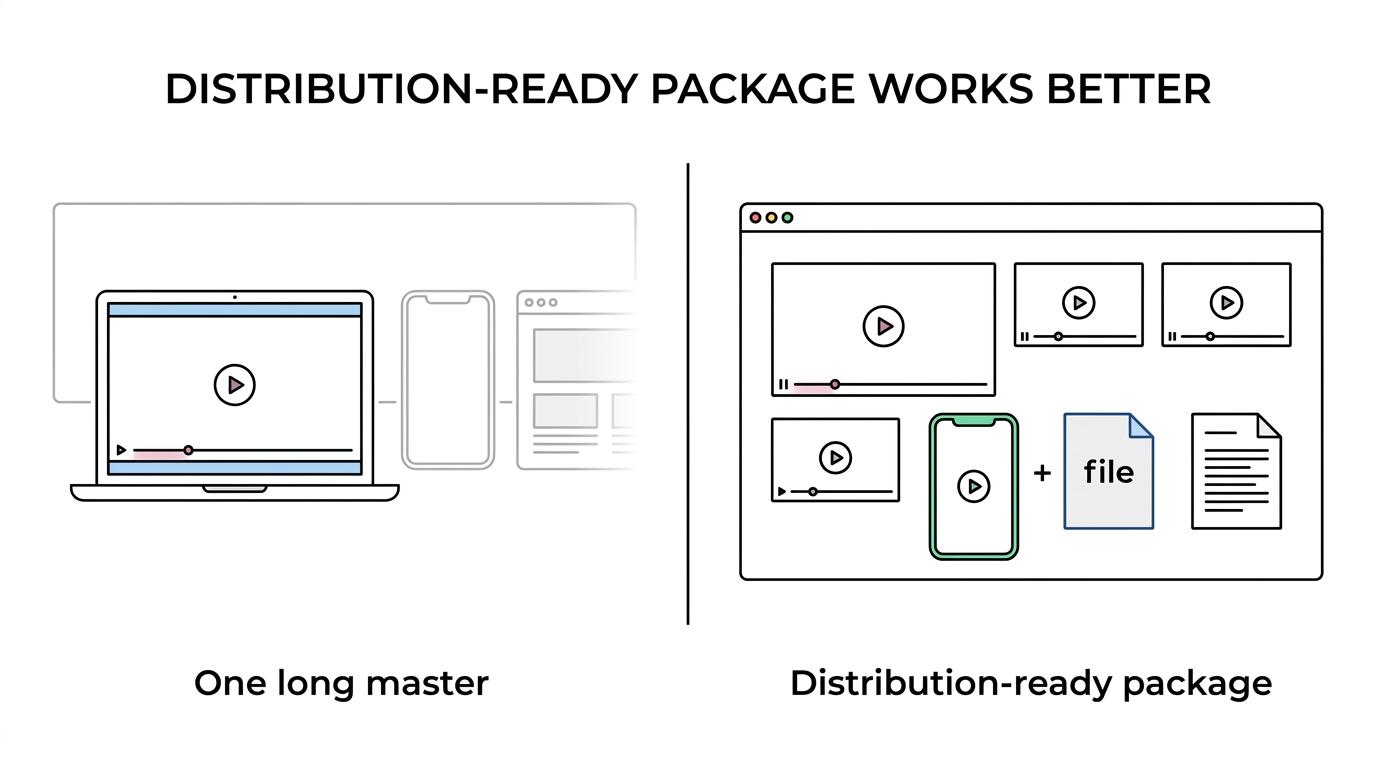
That does not mean the master is useless. It is still important for archive, recap pages, and future re-edits. The better question is what comes first. For most sponsors, the strongest mix is one polished recap plus two or three shorter cutdowns, captions, and a transcript. That package gives the team assets they can post immediately while still keeping a clean record of the event.
If you are planning conference videography or event coverage in Edmonton, we can help map the right deliverables before filming starts. You can also review our event videography in Edmonton, corporate video production, and Edmonton video production services. Ready to strengthen your sponsor package with professional conference video? Contact Q Filmz Media today for a free project consultation.